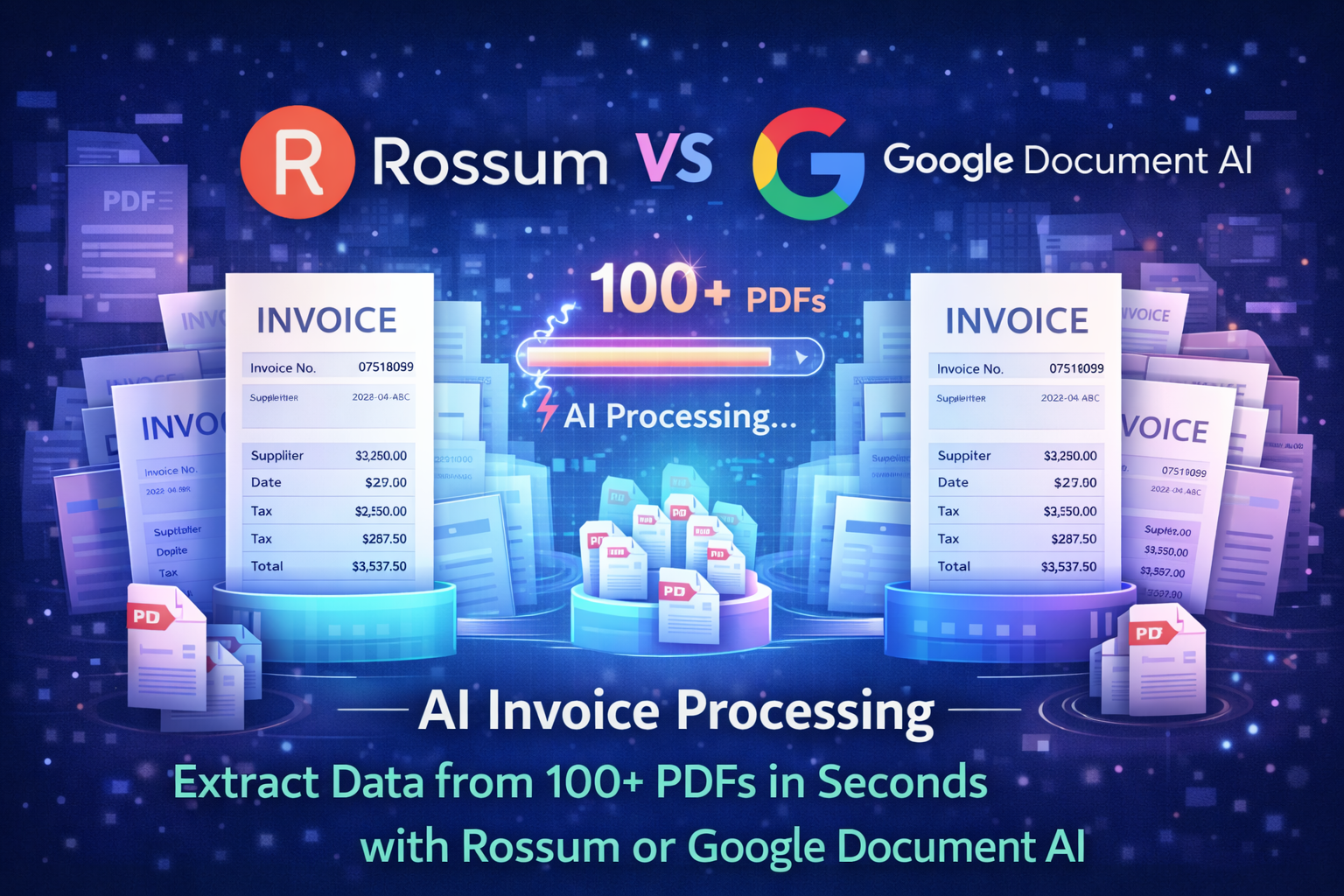
A few months ago I opened a folder that made my stomach drop.
Inside were over a hundred invoice PDFs from different vendors. Some were clean digital exports. Others looked like scanned documents from 2008. Different formats. Different layouts. Different fields.
And someone—unfortunately—needed to extract the data.
Invoice number.
Vendor name.
Invoice date.
Total amount.
Tax value.
You probably know where this story goes. Open a PDF, copy a field, paste it into a spreadsheet. Repeat… about a hundred times.
After doing that for roughly twenty invoices, I stopped.
There had to be a better way.
So I tested two AI tools designed specifically for this kind of problem: Rossum and Google Document AI. Both promise to read documents automatically and extract structured data in seconds.
The results were surprising.
With the right setup, these tools can process hundreds of invoices faster than you could open five PDFs manually.
If you’re dealing with stacks of invoices, purchase orders, or receipts, this guide will show you exactly how AI invoice processing works—and how to set it up yourself.
The Hidden Problem with Manual Invoice Processing
Invoice data entry sounds simple. It’s actually one of the most inefficient tasks inside many businesses.
The work is repetitive, slow, and prone to errors.
What Happens When Invoices Arrive as PDFs
Most companies receive invoices in PDF format.
The typical workflow looks like this:
- Download the PDF
- Open the document
- Locate invoice fields
- Copy values into a spreadsheet or accounting system
It doesn’t feel painful when you’re processing five invoices.
But once that number reaches fifty or one hundred, the process becomes exhausting.
Read Also: How to Use Claude 3.5 to Write High-Retention Scripts for YouTube
Why Manual Data Entry Breaks at Scale
After working with accounting teams and operations managers, I noticed the same problems appear repeatedly:
- human typing errors
- inconsistent formatting across vendors
- hours wasted on repetitive tasks
- delayed financial reporting
And the biggest issue?
People doing highly skilled work—finance managers, operations leads—spending their time copying numbers from PDFs.
That’s exactly the kind of work AI should handle.
Where AI Invoice Processing Helps
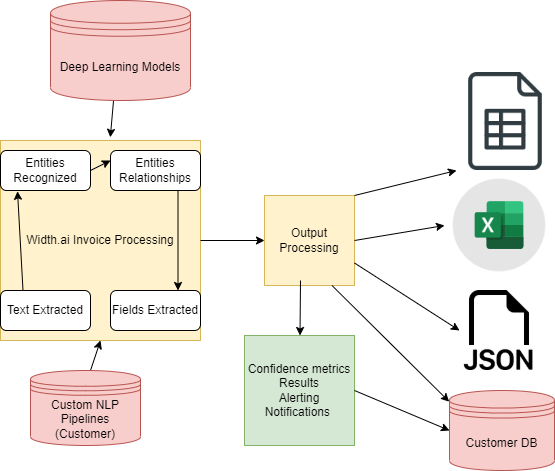
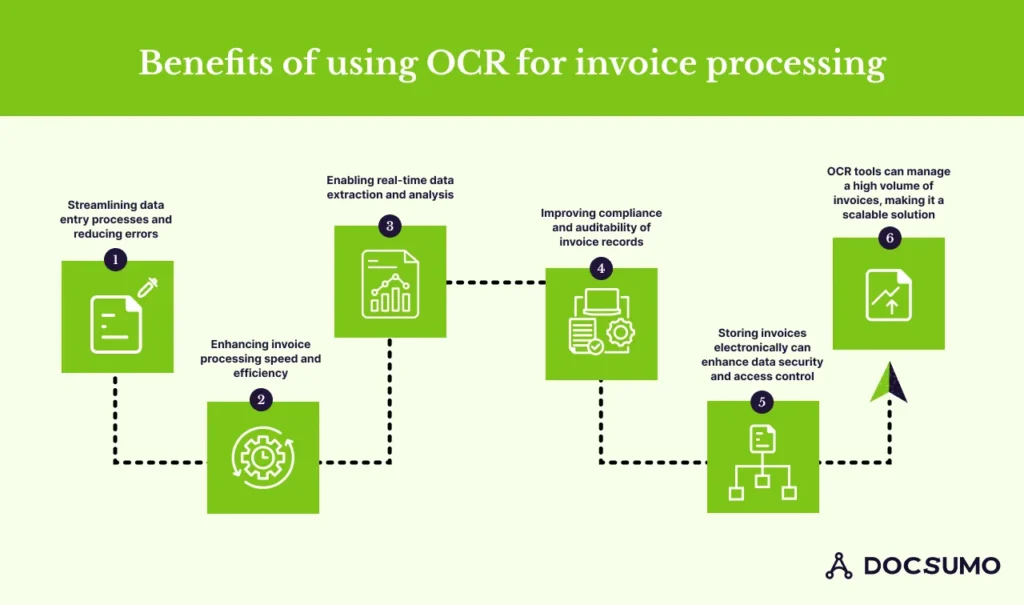
AI-powered document processing tools can automatically:
- read invoice PDFs
- identify key fields
- extract structured data
- export the results to spreadsheets or systems
Instead of opening every document manually, you upload them once and let the AI parse the information.
For teams handling large invoice volumes, that’s a huge shift.
What “AI Invoice Processing” Actually Means
The phrase sounds technical, but the idea is straightforward.
AI invoice processing uses machine learning models trained to recognize invoice structures and extract specific information.
Traditional Invoice Processing
Without automation, the process usually looks like this:
invoice received → open document → find values → type into system
Every step requires human attention.
Which means speed depends entirely on how fast someone can read and type.
AI-Based Document Processing
With AI tools, the workflow changes dramatically.
invoice uploaded → AI scans document → fields extracted automatically → structured output generated
Instead of reading documents line-by-line, the system identifies patterns like:
- invoice number
- supplier name
- purchase order references
- dates and totals
And it does this across hundreds of documents in seconds.
The technology behind this is called document AI—a category of machine learning designed to understand structured documents.
Read Also: How to Create a “Brand Voice” in Jasper or Copy.ai
Rossum vs Google Document AI — Quick Overview
Before testing the tools myself, I noticed they approach the problem slightly differently.
Rossum focuses heavily on invoice automation. Google Document AI is a broader document processing platform.
Rossum Overview
Rossum is designed specifically for finance teams.
Its platform specializes in reading invoices and extracting accounting fields automatically.
Key strengths include:
- invoice-specific machine learning models
- automatic field recognition
- validation workflows for finance teams
- integrations with accounting systems
It’s clearly built with accounts payable teams in mind.
Google Document AI Overview
Google Document AI is more flexible.
It supports multiple document types including:
- invoices
- receipts
- forms
- contracts
Instead of being a single-purpose tool, it acts as a document processing platform developers and teams can integrate into workflows.
Feature Comparison
| Feature | Rossum | Google Document AI |
|---|---|---|
| Invoice specialization | Excellent | Very good |
| Custom document models | Limited | Strong |
| Ease of setup | Easy | Moderate |
| Integration ecosystem | Strong | Very strong |
| Best for | Finance teams | Automation pipelines |
Both tools are powerful. But their setup experience feels different.
My Testing Setup (Processing 100+ Invoice PDFs)
I wanted to simulate a realistic scenario.
So I gathered a batch of invoice PDFs from different vendors.
The dataset included:
- invoices from SaaS vendors
- logistics invoices
- consulting invoices
- marketing service invoices
Each had slightly different layouts.
Some had clear tables. Others used completely different formatting.
My goal was simple:
Upload the PDFs and see how accurately each tool could extract the following fields:
- vendor name
- invoice number
- invoice date
- subtotal
- tax amount
- total value
Then measure:
- processing speed
- extraction accuracy
- ease of setup
Step 1 — Preparing Your Invoice PDFs
Before using any AI document tool, preparation matters.
Clean documents produce far better results.
Best Practices Before Uploading
If you’re planning to process invoice batches, follow these tips:
- use clear, high-resolution PDFs
- avoid heavily distorted scans
- group invoices into folders
- remove unnecessary pages if possible
AI models perform best when text is readable.
If documents are extremely blurry or skewed, even advanced models may struggle.
Fortunately, most modern invoices are generated digitally, which makes extraction easier.
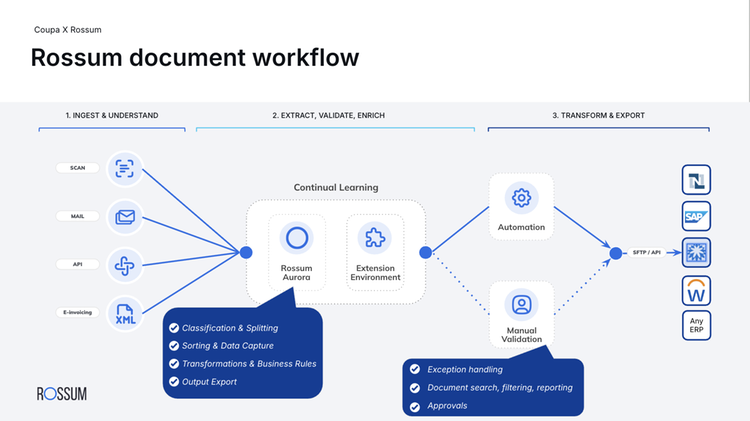
Step 2 — Extracting Invoice Data with Rossum
Rossum turned out to be the fastest platform to set up.
The interface feels very focused on finance workflows.
Creating a Rossum Workspace
The process looked like this:
- Create a Rossum account
- Set up an inbox or workspace
- Upload invoice PDFs directly
Once uploaded, the system automatically starts processing documents.
There’s no need to configure models or prompts.
Rossum immediately begins identifying invoice fields.
Fields Rossum Extracts Automatically
Within seconds, the system extracted fields such as:
- supplier name
- invoice number
- invoice date
- subtotal
- tax amount
- total invoice value
In most cases, the values appeared correctly on the first attempt.
When the system wasn’t completely certain, it highlighted the field so it could be reviewed quickly.
For finance teams that process invoices daily, this kind of automation is extremely practical.
Step 3 — Using Google Document AI for Invoice Extraction
Google’s approach requires slightly more setup but offers greater flexibility.
Setting Up Document AI
The workflow starts inside Google Cloud.
Steps include:
- Create a Google Cloud project
- Enable the Document AI service
- Select the Invoice Processor model
Once the processor is activated, you can upload PDFs directly or process them through API calls.
Uploading PDFs for Processing
When invoices are uploaded, the model analyzes the document structure and extracts key fields.
The output is delivered in structured data format.
Typically this looks like:
- invoice number
- supplier details
- line items
- totals
This information can then be exported into:
- spreadsheets
- databases
- accounting tools
For teams building automated financial pipelines, this flexibility is extremely useful.
Rossum vs Google Document AI — Which One Works Better?
After testing both tools, I noticed a clear pattern.
Rossum Advantages
Rossum feels purpose-built for finance workflows.
Its strengths include:
- quick setup
- accurate invoice recognition
- user-friendly interface
- minimal configuration
If your goal is simply extracting invoice fields quickly, Rossum works extremely well.
Google Document AI Advantages
Google’s tool shines when automation becomes more complex.
Advantages include:
- strong developer APIs
- support for many document types
- scalable cloud processing
- deeper customization options
For large systems integrating document processing into workflows, Document AI offers more flexibility.
Real-World Scenario: How AI Invoice Processing Saved Hours of Work
After running the batch of invoices through both tools, the time difference was dramatic.
Manually processing 100 invoices might take two to three hours.
Uploading those same invoices to AI processing tools took only a few minutes.
Once processed, the results appeared in structured tables ready for export.
Instead of copying numbers line by line, I simply reviewed the extracted data and exported it.
The tedious part of the work disappeared entirely.
For operations teams and finance departments, that kind of time saving adds up quickly.
Common Mistakes When Automating Invoice Processing
Even powerful AI tools require thoughtful setup.
Here are mistakes I’ve seen teams make.
- uploading extremely low-quality scans
- failing to review AI outputs
- ignoring vendor format variations
- skipping system integrations
Automation works best when it becomes part of a larger workflow.
Pro-Tip
Train the system using invoices from your most common vendors.
Many vendors use consistent invoice layouts.
If you upload several examples from those suppliers, AI models can learn the structure faster and improve extraction accuracy.
This small step can significantly reduce manual corrections later.
Final Thoughts: The Future of Document Processing
For years, administrative work involved reading documents and copying information.
AI document processing is slowly eliminating that step.
Tools like Rossum and Google Document AI can read structured documents almost instantly, turning messy PDFs into organized data.
For finance teams buried in invoice processing, this isn’t just a productivity improvement.
It’s a workflow transformation.
Instead of spending hours entering data, teams can focus on analysis, approvals, and financial planning.
And honestly, that’s a much better use of human attention.
